The franchise software that runs every territory.
Genaya runs each territory as its own company with its own phone line, branding, and review profile, on one shared Price Book and set of automations, and shows the owner every territory's day from one login.
It works with what you already use













One price book for every territory
Keep coatings, repairs, and add-ons in one Price Book with price, cost, and photo, shared by every territory. Assign an item to a territory when only that territory sells it.
Learn more



Build it once, run it in every territory
Install reminders, estimate follow-ups, and review requests are built once for the whole organization. Each one runs for every territory or only the ones you pick, and can sign every text with the territory's own name.
Learn moreOne company for every territory
Add each territory in Operations > Companies with its own name, logo, phone, email, address, time zone, and taxes. Give it its own business numbers, booking page, and review profile, and every appointment, estimate, invoice, and payment carries the territory it belongs to. Opening the next territory? File its LLC or corporation from the same page.
Learn moreEvery manager runs their own territory
Give each territory manager the Manager role and check the companies they run on their member page. Genaya limits their schedule, client, estimate, invoice, and payment lists, their dashboards, and their Genaya AI answers to those territories, while the owner sees every one. An installer who works two territories simply gets both.
Learn moreEvery territory answers its own number
Give each territory its own business number. Calls and texts land tagged with the territory the customer dialed, the dialer shows which territory you are calling from, and the Call Center filters by company, so each manager works their own line while you see all of them. When every estimator is out, the AI Receptionist answers, checks real availability, and books the visit.
Learn more
Assess every floor the same way in every territory
Build your slab assessment once in E-Sign Docs and every territory uses the same one: moisture test, cracks, staining, and the apron, with required fields so no estimator skips a step. The estimator fills it in on the phone, photos go straight onto the appointment, and the homeowner signs a report that carries the territory's own business name.
Learn more


Every estimate under the territory's own name
Turn what the assessment finds into a signed estimate before you leave the driveway. Pull the coating and repairs from the shared Price Book, keep the slab photos on the job, and let the homeowner approve and sign on your tablet or from the client portal. The estimate, the invoice, and the portal all show the territory's name and logo.
Learn more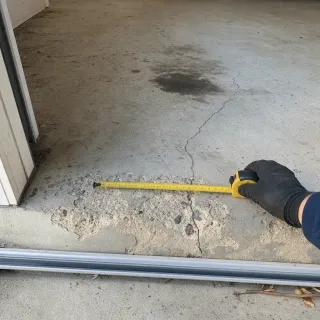
See what every territory collected
Every payment is tagged to the territory that earned it. The GenayaPay Overview breaks the money down by company, one tap narrows the whole page to a territory, and a territory manager only ever sees their own. Payouts go to the organization's bank account on one schedule.
Learn moreLet homeowners pay over time
A $3,720 garage floor is an easier yes in monthly payments. When financing is turned on for your account, homeowners in every territory can apply to pay a bigger invoice over time right from the payment page. You are paid the full amount the same way a card payment pays out, and each lender makes its own approval decision.




Run your operation on Genaya
Try Genaya free for 14 days
No credit card needed. Bring your clients over and run your first day on Genaya.
Three territories. One morning.

One spring Tuesday across three territories
Follow a single April Tuesday at a garage floor franchise owner who runs three territories on Genaya. Every moment below is the same platform and the same records - no tool switches, no re-typing.
A new-homeowner call comes in
Rachel just bought a house and wants its cracked, oil-stained garage floor done before summer. She dials the North Shore number, and Genaya rings the desk with the call tagged North Shore - and with every estimator already on the road, the AI receptionist answers and books the first open estimate slot.
Three territories on one board
The day's jobs drop onto the schedule board with all three territories picked. Marisol's crew starts day one of a big Fox Valley floor, the 7:42 call slots in at 11:00 in North Shore, and each territory manager sees only their own territory's day.
The slab tells the story
Derek checks in at the Brandt garage and runs the slab assessment on his phone. The moisture test passes, but the apron at the door is spalled and three hairline cracks run back into the slab. Every photo lands on the appointment as he takes it.
The floor becomes an estimate
Derek builds the estimate at the kitchen table from the shared Price Book - the coating, the crack and spall repair, the stem walls - with the slab photos right there. Rachel sees the crumbling apron for herself, taps approve, and signs an estimate that carries the North Shore name and logo.
Invoice out, paid in minutes
The approved estimate becomes the invoice with one tap - same record, same amount. The pay link lands by text, Rachel pays by card, and the payment is tagged to North Shore, right where the GenayaPay Overview breaks the day down by company.
The review lands on the right profile
Marking the visit done fires North Shore's review automation on its own, while the visit is still fresh. Five stars land on the North Shore profile, because each territory keeps its own reviews - nobody had to remember to ask.
The owner sees every territory
Vans parked in three lots. The dashboard shows what the day did across every territory - estimates, dollars, and ratings on one screen - and Genaya AI answers how each territory did in one line.
Built for the teams that run every territory


















See your own territories on Genaya
Book a demo and we will walk through your territories, calls, schedule, estimates, and payments, or start free today.
Franchise owner questions, answered
The short version of what multi-territory franchise owners ask before they switch to Genaya.
Each territory runs as its own company inside one Genaya organization, with its own name and logo, business phone numbers, email, address, time zone, taxes, booking page, and review profile. Calls, the schedule board, estimates, invoices, and payments all carry the territory they belong to, and you see every territory from one login.
Yes. Assign a team member to one or more companies and Genaya limits their schedule, client, estimate, invoice, and payment lists, their dashboards, and their Genaya AI answers to those territories. The owner always sees everything. A member with no company assigned sees every company, so assign each manager when you add them.
Yes. The Price Book, E-Sign Docs templates, and automations are shared by the whole organization. Assign a Price Book item to a territory when it is only sold there, and set an automation's company scope when it should run for only some territories. E-Sign Docs pre-fill the territory's own business name and address.
Inside one organization, GenayaPay pays out to one bank account on one payout schedule, and every payment is tagged to the territory that earned it, with a By company breakdown on the GenayaPay Overview. If a territory is a separate business that needs its own bank account and books, set it up as its own organization and connect the two with Multi Organization: once the other owner approves, you switch between them from the top-right switcher, and each keeps its own data and billing.
No. Genaya does not calculate, invoice, or collect royalties or brand fees. It keeps the numbers a royalty report is built from: every invoice and payment tagged to its territory, company filters on the invoice and payment lists, and Genaya AI answers like how much each territory collected last month.
Yes. Buy a business number for each company. Calls and texts to it are tagged with that territory, the dialer shows which territory you are calling from, and the Call Center filters by company. The optional AI Receptionist answers when every line is busy, checks real availability, and books the visit.
Add a company in Operations > Companies with its name, logo, phone, and address, give it a business number, and assign its team. If the new territory needs its own legal entity, Genaya Business Formation can file the LLC or corporation, with the EIN and a registered agent, and the new company lands in Genaya ready to use.
Yes. Genaya imports clients and jobs from CSV or Excel files and from many field-service tools, so no territory starts from an empty book.
Your crews do the work.Genaya handles the rest.
Every territory answers its own line, every estimate goes out under its own name, and every dollar is tagged to the territory that earned it, while you see all of it from one login. One platform for the owner, every territory manager, and every van.